Free Windows application
YDesign
Design Freely. Create Without Limits.
A free professional design studio for Windows, combining intuitive design tools, vector illustration, photo editing, and AI-powered creativity.
- Completely free
- Works offline
- Arabic support
- AI tools
- No watermark
Version 0.5.1 · Windows 10/11 (64-bit) · 166.7 MB
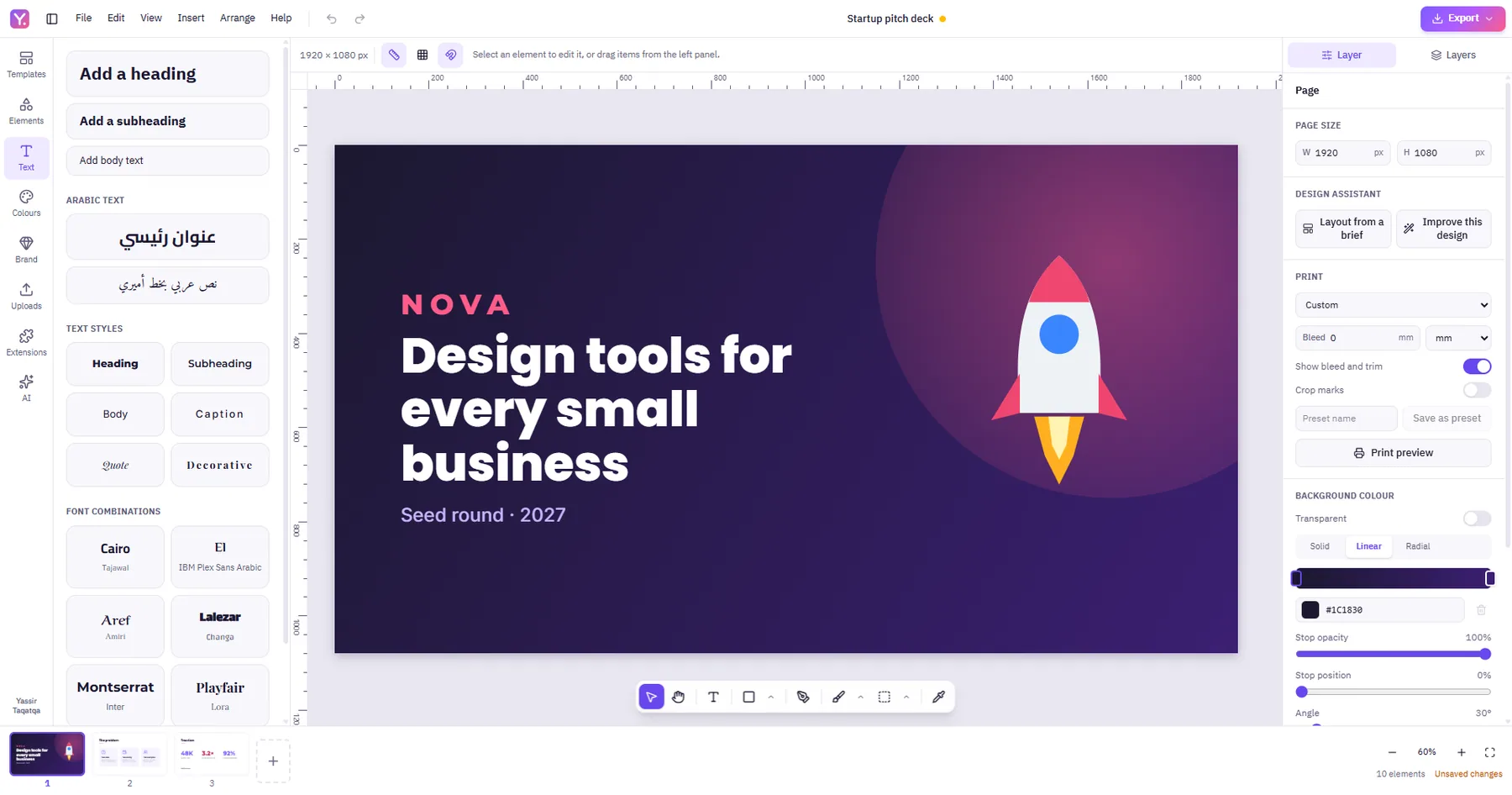
Screenshots
Inside YDesign
Real screenshots of the application, captured from the English interface.
Features
A complete design toolkit in one application
From the first idea to a print-ready file — with no subscription and no permanent internet connection.
-
Professional design editor
A full workspace for everyday design work: posts, logos, brochures and multi-page documents.
- Multi-page editing
- Layers and groups
- Advanced typography
- Arabic RTL support
- Gradients and effects
- Smart alignment
-
Vector design
Draw shapes and logos from scratch with vector precision that scales without losing quality.
- Pen Tool
- Bezier curves
- Node editing
- Boolean operations
- Editable SVG import and export
-
Photo editing
Edit images inside the design itself — no switching applications, no damage to the original.
- Brush and eraser
- Selections
- Clone Stamp
- Healing Brush
- Layer masks
- Non-destructive editing
-
AI tools
Models run locally on your own computer, download only when you choose, and never send your images to a server.
- Background removal
- Smart selection
- Object removal
- Image enhancement
- Image upscaling
- Image generation
- Text assistance
- Design assistance
AI models are optional separate downloads and their memory requirements differ per model — the Model Manager shows what your computer can run before anything is downloaded.
-
Templates and assets
Start from a finished design instead of a blank page, or build one from the bundled asset library.
- 154 editable templates
- 1,026 design assets
- Icons, shapes and illustrations
- Ornaments, frames and backgrounds
- 17 bundled font families
All templates and assets are original, licence-checked and work entirely offline.
-
Professional export
Export in the format you need, whether for digital publishing or for a print shop.
- PNG
- JPG
- WEBP
- SVG
- Print settings
- Bleed
- Crop marks
Includes colour management and CMYK PDF with an embedded print profile, and Arabic text in PDFs that can be copied and searched.
-
Offline-first
The editor and all its tools work without a connection: no account, no sign-in, no telemetry.
- No account
- No telemetry
- Your files stay local
- .ydesign project format
An internet connection is only needed to download the optional AI models.
Why YDesign
Why choose YDesign?
Built to be a real everyday tool, not a limited trial.
-
Free to use
No mandatory subscription, and no watermark on your designs.
-
Works offline
Design anywhere, without needing a constant internet connection.
-
Arabic first
A full right-to-left Arabic interface, with Arabic letters staying joined in designs and in exported PDFs.
-
Advanced tools
Vector, raster, typography and print-ready output in a single application.
-
Local AI
Optional models that run on your machine — your images never leave your computer.
-
Your projects, your files
Projects are saved locally in the .ydesign format, with autosave and backups.
Download
Download YDesign
No account, no subscription, no extra steps — the download starts immediately.
Official installer · the download starts on click
- Product
- YDesign for Windows
- Version
- 0.5.1
- Installer
- YDesign-Setup-0.5.1-x64.exe
- Size
- 166.7 MB
- Operating system
- Windows 10/11 (64-bit)
- Release date
- 2026-11-15
Before you install
- The application is completely free and needs no account.
- The installation needs about half a gigabyte of disk space.
- AI models are optional and are downloaded later from inside the application, only if you want them.
System requirements
The editor itself is light and needs no special hardware. Only the AI tools ask for more resources.
Core application
- Operating system
- Windows 10 or 11, 64-bit (tested on Windows 11)
- Disk space
- About 0.5 GB for the application
- Internet
- Not required for designing — only to download the optional models
- Account
- No sign-up and no activation
AI tools (optional)
- Memory
- From 2 GB for the small models, up to 10 GB for the largest text model
- Recommended
- 16 GB for the heaviest models
- Model storage
- From 5 MB per model; all fourteen models together are about 5.5 GB
- GPU
- Not required — the CPU is the default, with DirectML as an option
All measurements were made on a single development machine (Intel Core i7-14700, 32 GB RAM, integrated Intel UHD 770 graphics). Performance on other computers, and on dedicated graphics cards, has not been verified.
A transparent download
This is the only official build of YDesign. You can verify the file before installing it.
SHA-256 checksum
D3B4876F459928DC88F2615E87FBE7E385B1D58EF40B72D76A42AFF5BDC871C9
- Official source
- yassirtaqatqa.com
- Developer
- Yassir Taqatqa
- Size in bytes
- 166,717,934
- Release date
- 2026-11-15
- Code signature
- Not signed yet
Windows SmartScreen may show a warning
The installer does not yet have a code-signing certificate, so Windows may show a warning the first time you open it. That is normal for new, unsigned software. To confirm the file is intact, compare the SHA-256 checksum below with the checksum of the file you downloaded.
What this page measures
I count how often this page is viewed and how often the Download button is used, with first-party measurement only: no cookies, no device fingerprinting, no third-party tracking service. Your IP address is never stored — it becomes a pseudonym that changes every day, so nobody can be followed from one day to the next. YDesign itself contains no tracking at all: your designs, images and prompts stay on your computer and are never sent anywhere.
Developer
Yassir Taqatqa
Software developer building modern applications and digital solutions.